Search Blog

Showing posts with label Blogger. Show all posts

Blogger Changes after Google Plus Shutdown

Blogger Changes after Google Plus Shutdown - Google has recently announced the shutdown of  Google plus due to low usage from consumers. Although the number of social media users has increased from 2010, Google plus has under performed when compared to its competitors like Twitter and Facebook.

Also Check: Get SEO Software for your Blog

Following this announcement, the social media network will officially close down on April 2nd, 2019. Since Google plus and Blogger have some common features, a number of changes have been made to Blogger’s Google plus  integration as of 4 February 2019.

Blogger Changes after Google Plus Shutdown

Blogger Changes after Google Plus Shutdown

A number of widgets have been removed from layout selection and cannot be used in the blogger blog:
  • +1 Button
  • Google plus  Followers
  • Google plus  Badge

Support for these widgets in Layout is no longer available. However, you can add these to your blog through 3rd party code but they will also stop working after April 2nd, 2019.

Also Read: 8 Content Marketing Tips for Beginners

Custom Blogger Templates

If you are using a custom blogger template that includes Google plus features, you need to update your template manually or you can contact your template provider to make the appropriate changes.

Google Plus Comments

Support for Google plus comments has been turned off, and all blogs using Google plus comments have been reverted back to using Blogger comments as default commenting sign-ins. Also comments posted as Google plus comments have not been migrated to Blogger and can't in any way appear on your blog.

Looking for Blog SEO services? Don't forget to follow the blog AKBlogs on facebook and Twitter.
Share:

Updating Old Blog Posts for Driving more Traffic

Things which demand less input and gets high output are liked by everyone, the creator and the consumer. Some hacks really work well when we have to recycle or make our old stuff more workable. Same goes for old blog posts, when you apply some trick and polish their content so that they may look new and drive more traffic to your website.

Updating Old Blog Posts for Driving more Traffic

Updating Old Blog Posts for Driving more Traffic

A “power ruling” may be applied to some older posts, which are able to drive more traffic to our blogs even sometimes they are not constructed by following all principles of SEO.

Why it is significant to update old blog posts?

A big ‘food for thought,’you might be wondering that if a post is already driving more visitors to your website why is it necessary to update that post. Here is the answer, first analyse which post is playing that essential role of attraction; it is necessary to update that post because it will allow your readers to read more about that topic with new and better details. It will also enhance the probability of those visitors to visit your website often. Moreover, giving them a kick of curiosity to explore more articles.

Check out: Blogging Underground Targeted Traffic System 

How to analyse which posts must be updated?

Now, this is the part where you take decisions which forces you to think about the selection of topics, which posts must be updated and which should be left without streamlining. First of all make a list of all articles like we did, and following these steps will help you more:
  • Do some statistical analysis whether updating this topic costs you more or it will drive more traffic
  • Analyse the rankings of your blog posts, updating these topics will include your blog in the list of first 10-20 or 5-25 of blogs or not
  • Check the monthly search volume of that topic
  • Weigh the estimated time for streamlining with estimated traffic
  • Calculate the specific budget for one time modernization, than roughly estimate that, if you repeat the same procedure after a month or two; is it affordable for you?

Process of updating blog posts

This process of updating old posts includes few steps, which are listed below:

Refreshing anchors

If you are adding more relevant links to your post, whether these links are internal or external it is a good step towards improvement. Moreover, remove all old irrelevant links, which do not support your topics or writing.

Remove broken links as it impacts negative SEO, use this tool to check for unwanted links.

Updating those queries, which do not demand freshness

If your article is about technology or new inventions or any scientific topic, which demands more fresh material to be added in it; it is a good idea to add new content in it. Otherwise, if your topic is about history or any other topic, which do not require new material to be added in it; marketing those articles will not profit your aim.

Adding helping material

Add some amazing facts, formulae or keywords related to your topic, which helps your reader to enhance his or her knowledge and allow him to search more about that topic.

A Simple Tip

Tip for improvement is; you must not add the content, which deviates from the topic it will lessen your reader's attention towards the article.

Change your time stamp of your blog post “published on” to “last updated” and actually adding noticeable fresh material in the form of new tags, information or keywords. It will grab more attention from your reader. This helps updating old blog posts for driving more traffic.

Also Read: Get Online SEO Services from AKBlogs

Follow AKBlogs on facebook and Twitter.
Share:

The Best Blogging Platforms For Bloggers 2019

The best blogging platforms for bloggers of 2019 are here. I've compiled the list. But first let's have a look at what a blog is first. Blog is a place where people share their valuable ideas and thoughts with millions of people of the same interest. Blogging is still popular despite the domination of social media sites, which have ruined the beauty of sharing thoughts and ideas with others and interacting and make contacts.
The Best Blogging Platforms For Bloggers 2019

Almost 10 years back, blogging was something which was not done by everyone because at that time for creating a blog you would have needed programming knowledge, so it was not everyone’s cup of tea. But today many technologies have made blogging easy and it has changed the internet world completely.

What if I tell you that you can have your own blog free of cost without any coding knowledge. Want to know how, then stick till the end.

Today many blogging platforms have emerged and it is quite confusing to decide which platform is best for blog. So here we present the best blogging platforms for bloggers 2019.

What is a Blogging Platform? 

First you need to know what is a blogging platform. Blogging platform is a content management system for creating and publishing your content on websites like WordPress, Blogger and many more.

The Best Blogging Platforms For Bloggers 2019

Here is the complete list of blogging platforms you should know if you are planning to start your own blog.

Before you actually start a blog, you will need to purchase web hosting and the most reliable webhost that I’d recommend is HostGator. HostGator is providing the most cheap hosting plan which is the shared hosting plan. Even if you will choose the Yearly Shared Hosting plan, you will be able to save a huge 75% of your total hosting cost. Click here to get 75% off on hostgator hosting plan 

1) Blogger.com - Create a unique and beautiful blog. It's easy and free.

Whenever it comes to blogging the word blogger strike through everyone’s mind. Blogger is a free blogging platform from google and is very easy to setup if you are just starting to step in blogging world. Many big bloggers have once used blogger because blogger is free and doesn’t charge you for anything. Using Google Adsense with Blogger can enhance your income alot because Google Adsense revenue share with Blogger is 0%.

You can easily create your own blog in few minutes with a free sub-domain which is great for newbies to start. However, blogger has some limitations like you can only create a simple blog ,but if you want to create attractive and responsive blogs then you lack this feature here.

However, new responsive themes are now present to download and use. Some are external while some are available as default blogger themes.
Blogger.com - The Best Blogging Platforms For Bloggers 2019

2) WordPress.com: Create a Free Website or Blog

After blogger the second name the comes in the list is WordPress which is free platform for blogging and has all the tools for creating beautiful blogs. You can unleash your creativity with WordPress. You can signup for free plans and you will get plenty of tools to work with and learn new stuff.

However there are some limitations in the free plan and for some features to use you will need to purchase their business plan where you get a custom domain also. WordPress is very popular among many blogger because its functionality is great and offers a huge number of plugins for various works.

Wordpress - The Best Blogging Platforms For Bloggers 2019

3) Wix.com: Free Website Builder | Create a Free Website

Well in terms of creating attractive and beautiful web pages, you should take a look at wix which is an amazing platform. The best part of Wix is that it gives drag and drop features with which you can have fun and also make quick changes.

Wix is very easy to use and an amazing platform for bloggers to work on. Starting with wix is free and you can easily setup you blog in few clicks. But every free thing has a hidden catch, here is the catch with Wix. In free plan you have limited resources and limited designs so to unlock all the extras you have to purchase the premium plans.

In free plan you will get 500MB disk space and 1GB bandwidth which I think is not good for blogs with good traffic.

Wix - The Best Blogging Platforms For Bloggers 2019

4) Yola - Make a Free Website

Yola is similar platform to wix. It also gives drag and drop features. Starting with yola is easy. Yola offers a free plan in which you will get some limitations like you can host 2 blogs and each blog have 3 pages.

It offers many cool features like great site-builder to put all the things together and choose from hundreds of customizable themes. You also get the feature of editing its CSS properties if you have skillful knowledge of CSS.

Yola - The Best Blogging Platforms For Bloggers 2019

5) Hubpages

Hubpages is a bit different platform from the others as hubpages is a huge network of bloggers,who can share their stories and can communicate with each other through their blogs. It offers some cool features like arts and design section where you can become more creative and show off your design skills to others. Hubpages helps every blogger to connect with each other and earn revenue from ads and affiliate ad networks.

Hubpages - The Best Blogging Platforms For Bloggers 2019

6) Tumblr

Tumblr basically looks like a mixture of WordPress and twitter. It is easy to share you blog content and it also has a huge community.
Tumblr - The Best Blogging Platforms For Bloggers 2019

7) Edublogs – free blogs for education

Edublogs is a education blogs for students, teacher and other education related personnel. Here, if you are fond of design and creation then this is your place to hangout. Edublogs is powered by WordPress and is free.

Here you can share educational related things with your college friends and teachers for free. They give you a lot of benefits and features to interact with each others. The free plan comes with 250 premium themes and 1 GB of storage space. However for extras you have to buy pro plan, if you want to get serious with your blog.

Edublogs - The Best Blogging Platforms For Bloggers 2019

8) Jekyll - Simple, blog-aware, static sites

Jekyll is an amazing platform to host your blog as you will need to put raw text files and then it will turn it into a robust static site to host. It is the engine behind GitHub pages which means you can host your blog for free here. Making your blog with Jekyll takes away the hassle of managing databases and storage.

Jekyll - The Best Blogging Platforms For Bloggers 2019

9) Ghost

In ghost something is different. Unlike others on this list. How much you pay for ghost is depending on the size of the traffic and although it is free for 14 days because of trial. Ghost platform is slightly different from others as it is an open source. The most unique feature of ghost is that it gives preview of your post, how is it going to look while you are writing it down.

So, here are the best blogging platforms for bloggers 2019. You should choose you blogging platform wisely and don’t end up wasting your time on completely useless sites.

Also Read: What is Contextual Advertising?

Don't forget to follow the blog AKBlogs on facebook and Twitter.
Share:

How to transfer your blogger blog

If you have a blog at, suppose, http://example.blogspot.com and you want to take that blog to another domain like http://Ali.blogspot.com. Keeping in mind that the latter domain is an available domain in blogspot. Alongwith the all the data of your blog then simply follow the following steps:

How to transfer your blogger blog

  • Open your blogger account.
  • Click on "Setting" option of the blog you want to transfer from one domain to another.
  • Goto "Basic". (It is already on "Basic" as a default.)
  • Click on "Export Blog"

How to transfer your blogger blog

  • On the opening display, click on "Download Blog" button. Your blog will be downloaded automatically in an XML document. All the content of your blog will be downloaded in this xml file. This xml file can also be used as a future back up for your blog.
  • After downloading it, open the blog's setting option where you want to upload this content on. You should already register it to make sure you can transfer it to that address. Using this xml file you can even transfer all the blog content including comments to a wordpress blog.
  • Click on "Basic" and click "Import blog" button.
  • Simply choose the file from your computer and upload it to the new blog.

Now your blog is available at a new blogspot domain. There is another way of transferring your blogger blog.

Also Read: How to Migrate from http to https on Blogger Blog with Custom Domains

Another way to transfer your blogger blog

Now we are going to change your blogger blog's domain name instead of copying all your data we will simply rename your blog's address. The only thing now will be check all your blog's internal links. Simply follow the steps to transfer your blogger blog to another address:

Go to "Setting"
Click "Basic" (It is already on "Basic" as a default)
Scroll down to "Publishing" as shown in figure

Another way to transfer your blogger blog


Simply change your publishing settings and change your blog's sub-domain here to the new name. It is easier than the first.

Don't forget to follow the blog AKBlogs on facebook & Twitter.
Share:

How to get Google Adsense Account Approval

How to get Google AdSense Account Approval? This was once a very big issue but lately Google AdSense had closed down a lot of its member’s accounts which were wasting their time and not earning as much as they should have had. Wasting time does not mean earning less, but it means using derogatory means to earn the few dollars they were earning.

People need to know what Google AdSense wants from its publishers and how they can achieve that goal. I’ve written an article which covers a lot of Google AdSense requirements but in this one I will detail a few requirements that will enhance your chances of getting an account.

How to get Google Adsense Account Approval

Getting Google AdSense Account Approval

Google AdSense is a contextual advertising based company. Google AdSense is concerned about a lot of stuff. Their team looks for a lot of rules before approving it. But here I will tell you few pointers that will give you a better website at the end.

A User Friendly Website Theme

Google AdSense is concerned about theme design which should be user friendly. I recommend using a responsive theme for your website. If it’s a blogger blog, it will surely support a lot of default responsive themes.

If you intend to get an outside theme, either it’s cracked or free, it doesn't matter. Google AdSense approval depends on how much user friendly your website is overall and where are you placing ads on it.

Google AdSense doesn’t like their ads place on pop-ups and other derivatives which show ads.

Website should have Main pages

Every website should have a main menu where you can see the main pages of that website. These pages give new users a better idea about the website’s authority and trust worthiness. Pages like:
  • About us
  • Contact us
  • Privacy policy
  • Advertise here

help new users feel that they can trust this site. Also it develops your website to become something better.

Website articles should be unique and long

Content rich is the word that people use for a long article. Your article should in theory be long and supports the topic and title with accurate facts and figures. Also unique articles will get you help with your website’s SEO.

Writing unique content is the very reason so many blogs exist. Unique content helps drive traffic and hence revenue.

No Duplicate Content

Duplicate content is not a big issue as far as google indexing or a website’s SEO is concerned. However Google AdSense takes this fairly seriously. Having duplicate content means you were unable to produce good quality content on your own and relied on plagiarism for authority.

Since the content is not original, it is a good chance that you will get website traffic from different means too which are somewhat frowned upon by Google AdSense.

Original content helps drives viewers and sales. Copying content can even get an approved Google AdSense account revoked.

Also Read: List of Top 7 Google Adsense Revenue Sharing Sites

Don't forget to follow my blog Ali Khan Blogs on facebook Twitter.
Share:

Responsive Blogger Template Sora Free Download

If you want to get the responsive blogger template Sora, free download in this case. Not the original version, but the edited version by AKBlogs then click here to download. Once you've downloaded the template, upload it to your blog and enjoy the better and improved version of the template.

The download is hosted on Google Drive, so this template is free for everyone to use and edit. A preview of the template is shown below:

Responsive Blogger Template Sora Free Download - Edited for Mobile by AKBlogs

Related: Download Free Responsive Blogger Templates Neko 2018

Responsive Blogger Template Sora Free Download - Edited for Mobile by AKBlogs

The template is responsive, so its width adjusts to any screen. Also it's size is small, almost 395kb, so it loads faster. I've made some adjustments for mobile so you can get the most from your mobile audience. Also since it is optimized for SEO, it will make your mobile search engine rankings better.

Installing Responsive Blogger Templates

After downloading the template, installing the template is easy. Just follow these steps:
  • Go to themes in your blogger account 
  • Click Backup / Restore (See picture below for detail)

Installing Template - Responsive Blogger Template Sora Free Download - Edited for Mobile by AKBlogs

In the opening menu, click choose file and upload the downloaded xml file so that the new Sora theme edited for mobile by AKBlogs can be applied to your blogger blog.

Template Fixes

I've changed the theme a lot considering it looks very different from the original theme found online. I've added additional sharing buttons, sharing widgets and a better font size for mobile devices to read better. Although you can change it all using theme editor on blogger.

Apart from that there are only minor changes to the template. Enjoy the responsive blogger templates Sora free download.


Don't forget to follow my blog Ali Khan Blogs on facebook Twitter.
Share:

Download Free Responsive Blogger Templates Neko 2018 - Edited by AKBlogs

If you want to download the free responsive blogger templates, Neko template in this case, not the original version, but the edited version by AKBlogs then click here to download. Once you've downloaded the template, upload it to your blog and enjoy the better improved version of the theme.

The download is hosted on Google Drive, so this template is free for everyone to use.

Download Free Responsive Blogger Templates 2018 - Niko - Edited by AKBlogs

Related: Responsive Blogger Template Sora Free Download

Download Free Responsive Blogger Templates Neko 2018

The template is responsive, so its width adjusts to any screen. Also it's size is small, almost 35kb, so it loads faster.

Installing Responsive Blogger Templates

After downloading the template, installing the template is easy. Just follow these steps:

  • Go to themes in your blogger account 
  • Click Backup / Restore (See picture below for detail)


Installing Template - Download Free Responsive Blogger Templates 2018

In the opening menu, click choose file and upload the downloaded xml file so that the new Neko theme edited by AKBlogs can be applied to your blogger blog.

Template Fixes

I've changed the theme a lot considering it looks very different from the original theme found online. One major fix is the missing h1 tag. The lack of an h1 tag affects the SEO of a blogger blog a lot. I've fixed this issue.

Also the main page had a featured slide which showed 5 posts that the creator wants to be placed there. I've removed it so the new user can see my most recent post first and not the ones I have to change every once in a while.

I've added additional sharing buttons. Apart from that there are only minor changes to the template. Enjoy the free responsive blogger templates Neko.


Don't forget to follow my blog Ali Khan Blogs on facebook Twitter.
Share:

List of Top 7 New Google Adsense Best Revenue Sharing Sites in 2018

The list of top 7 new Google Adsense best revenue sharing sites in 2018 consists of the most trusted and user friendly sites known to the community of google adsense users.

Google Adsense is one of the most valid and trustable ways to earn money online. Although people tend to search for earning ways on the internet but making a website or blog and earning through it using Google adsense is one of the best ways to earn from the internet.

In this article, I will tell you about the top 7 new Google Adsense best revenue sharing sites in 2018, that will help you earn more from your Google Adsense account.

Related: Beginner's Guide to Google Adsense

What is revenue sharing?

Revenue sharing is enabling a site to earn from your Google Adsense account and having a mutual profit for both. With the help of this partner website, you will promote your content and you can earn through Google Adsense.

Google AdSense Best Revenue Sharing Sites 2018

Top 7 New Google Adsense Best Revenue Sharing Sites in 2018


The most popular Google Adsense revenue sharing website is likely to be Youtube or BloggerHere is a list of websites that can help to increase your income from Google Adsense:


1# Youtube

Youtube is one of the best sites when it comes to increasing your Adsense income. The best way to earn through youtube is by socializing your youtube videos through social networking sites like Facebook & Twitter.

Related: Youtube SEO

The more views you get for your video, the more are the chances of you getting the maximum amount to earn from Google Adsense. Some people earn approximately thousands of dollars a year through their youtube videos and channels. Youtube is definitely one of Google Adsense best revenue sharing sites in 2018.

Youtube is one of the best sites when it comes to increasing your Adsense income

2# Blogger

Blogger is the second best source of increasing someone's Google Adsense income. You can write as much as you want about anything and you actually get paid for it. The more the people visit your blog the more you can earn through it.

The popularity of your blog is directly dependent on the number of your blog posts. Blogger is definitely one of Google Adsense best revenue sharing sites in 2018.

Related: Blogger Alternatives


Blogger is the second best source of increasing someone's Google Adsense income. You can write as much as you want about anything and you actually get paid for it. The more the people visit your blog the more you can earn through it.

3# WordPress

Wordpress is a blogging site apart from being the world's most used blogging tool. Almost 30% of the world's websites are made using Wordpress. The main thing about it is that it makes your blogs popular using all sorts of plug-ins. It is good for writing blogs and using for cross references.

Inorder to make revenue from your Wordpress blog, wordpress will take 50% of your Google Adsense income, i.e., their revenue sharing is 50%.


Related: Beginner's Guide: Define Ad terms and Ads definitions

4# Google Custom Search Engine

Google Custom Search engine works as same as the ordinary Adsense for Search search engine works but it allows you to search only the chosen websites or blogs, which are chosen by you.

Like if I have 5 websites, I add them to my custom search engine and put the search engine in all the websites. Now, if any one wants to, he can search all of my five website at one place and this will also show Google Adsense search ads with them too.

Google Custom Search Engine allows a variety of colour layouts. Also their revenue sharing is 50%.

Related: Google Adsense Ads in Search Results

Google Custom Search engine works as same as the ordinary Adsense for Search search engine works but it allows you to search only the chosen websites or blogs, which are chosen by you.


5# Weebly

Weebly a free website hosting service with lots of interesting tools and gadgets like site stats and easy to use user interface as well. They not only allow you to host websites but also make websites using The Weebly website builder. The Weebly website builder is easy to use for newbies.

They take 50% of your adsense income. Revenue sharing is 50%.

Related: Beginner's Guide: Define Ad terms and Ads definitions

Weebly a free website hosting service with lots of interesting tools and gadgets like site stats and easy to use user interface as well. They not only allow you to host websites but also make websites using The Weebly website builder. The Weebly website builder is easy to use for newbies.

6# Trend Hunter

Trend Hunter is the #1 largest trends site and trend spotting community. Their main focus is on fashion trends, trend reports, style trends, gadgets trends, tech trends, pop culture trends, art trends and design trends.

Trend Hunter is the #1 largest trends site and trend spotting community. Their main focus is on fashion trends, trend reports, style trends, gadgets trends, tech trends, pop culture trends, art trends and design trends.

7# HubPages Network 

HubPages is a basically a community of writers, authors and knowledge seekers, interacting and informing each other about their opinions. On hubpages you can start a post and share your experience using words, pictures and videos.

HubPages is a really nice and rewarding experience for new bloggers who want to improve their skills. Also the tools are great. You can build an audience and get all sorts of rewards including monetization of your own articles.

HubPages has over 42,000,000 visitors per month. It has a golbal rank of 10k+ as of July 2018.

HubPages is a basically a community of writers, authors and knowledge seekers, interacting and informing each other about their opinions. On hubpages you can start a post and share your experience using words, pictures and videos.

Related: Beginner's Guide: Define Ad terms and Ads definitions

I hope this article helps you. These websites are the top 7 new Google Adsense best revenue sharing sites in 2018.

Don't forget to follow my blog Ali Khan Blogs on facebook at Akblogspk.
Share:

Socializing a Blogger Blog on Twitter with FeedBurner

Ever since I started posting on my blog, I used to copy my blog post links and paste them to my twitter account tweets with customized headings that would make my tweets descriptive towards my blog post and make it likable. The main reason I did this was to get as much traffic as possible for my newly made blog post through twitter.
However, it took me quite the time to realize that certain websites can do this work for me and also do it in a better way.
  • These websites can post tweets of blogger posts to multiple twitter accounts
  • These websites can post tweets automatically as soon as the post is posted (some take time as much as 30 minutes)
  • These websites can post blog links to other social media sites as well
  • They also tend to repost old posts so that you keep getting traffic
  • They also allow email subscriptions feature
Since we only discuss twitter sharing in this post. We will be discussing a website that offer posting only tweets on your behalf.

FeedBurner

FeedBurner is a free feed management website owned by Google (just like Blogger). It is a very useful tool for bloggers and helps bloggers grow their page followers and keep their readers interested.
When you create a new blog on blogger an xml feed is automatically created for that blog and its address is as follows:
your-blog.blogspot.com/feeds/posts/default
We will see how to create a feed through feedburner for your blogger blog.

Creating a FeedBurner Feed for your Blogger blog

Creating a feed for your blog is easy. FeedBurner can create a blog's feed in a few simple steps. After logging in to feedburner through your google account at feedburner.com you will see the lists of all the feeds you created or if its your first time visiting you will be shown a page where you will be prompted to either "Claim your Feed" or "Burn a new Feed" like this:


Now for the first step, enter your bloggers address in the text box as shown below and click next.


On the next page you will be prompted to select the type of feed. Blogger generates two different xml feeds for your blog i.e., Atom and RSS.


Check the RSS option as your default and click next. On the next page you will asked about the title of the feed and its address. You should keep the feed title the same as the blog's title with the suffix "Feed" and the feed address that represents your blog like my blog's feed address is feeds.feedburner.com/AliKhanBlogs which ends the same as my blog's name.


After clicking next your blog's feed will be created and a new page congratulating you on its creation will be shown.


Linking the FeedBurner Feed to Blogger Blog

After you have successfully created the feed, the most important thing to do is to link it with your blogger blog. Now copy the feed address and paste it in bloggers:
  • "Setting" tab - "Other" tab - Post Feed Redirect URL option (see image below for detail)


Click Add and paste the feed URL in the "Post Feed Redirect URL" dialog box that appears and click save.
Your Blogger blog's FeedBurner feed is successfully created and linked to your blog. From now onwards when you or any other visitor opens your-blog.blogspot.com/feeds/posts/default he will be redirected to your feedburner feed. 

Socializing your Blogger Blog with Twitter with FeedBurner

Now for the part you came here for. Login to feedburner and select your feed. On the opening page select "Publicize" tab as shown below:


On the side tab select "Socialize" and the following page appears.


Click "Add a Twitter Account" button and link your twitter account with feedburner. Select the appropriate formatting options and finally click "Activate" to start using feedburner services for your blog.


Conclusion

Your new blogger posts will automatically be posted by using a site called feedburner. Simply login their with your google account and claim your feeds by entering the URL address of your website. Follow the steps mentioned above to create your feeds and click on "Publicize" tab. On the left hand side you will see a "Socialize" button. In that menu add your twitter account and enable that feature by clicking the "Activate" button  at the bottom left side of the page. Now every time you post a new post, feedburner will automatically tweet a link of your blog post in your profile.


Don't forget to follow my blog Ali Khan Blogs on facebook Twitter.
Share:

Free Sitemap Generator for Blogspot Blog

In this article I will tell about a free sitemap generator for blogspot blog. If you have a blogger blog then blogger generates a sitemap for your blog at this address automatically when your blog is created:

Free Sitemap Generator for Blogspot Blog

The part I've highlighted above is same for all blogspot blogs. Just like RSS feeds. Copy the part highlighted and put it after your blogger blog's address like in the figure. You can copy from below:

atom.xml?redirect=false&start-index=1&max-results=500

Free Sitemap Generator for Blogspot Blog 

You blog's sitemap's address will look like the following link:

alik-blogs.blogspot.com/atom.xml?redirect=false&start-index=1&max-results=500

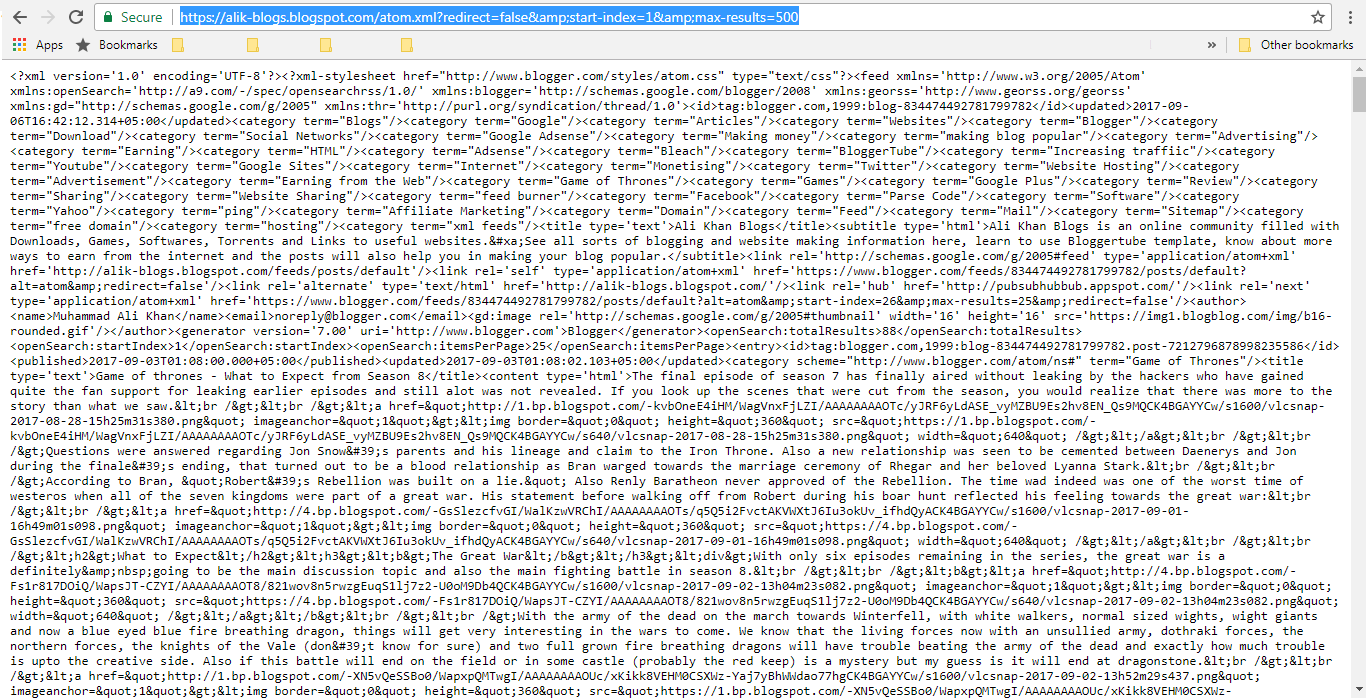
After you've opened the link containing the blog's sitemap you will see a webpage like this:

Free Sitemap Generator for Blogspot Blog


This is how the sitemap looks like.

What is a Sitemap?

It is a file that contains all the URLs of a blog. This file is then used by search engines like Google, Bing, etc., to index all the URLs in their search.

Bloggers like me use sitemaps to get better SEO results from search engines. Also alot of traffic for new websites/blogs comes from Search Engines. Let me show you how to submit your blogspot blog sitemap to a popular search engine Bing.

Submitting Blog Sitemap to Bing

Submitting a sitemap to a search engine is easy there are only a few prerequisites to submitting a blog to be indexed:
  • Blog's URL 
  • Blog's Sitemap
  • Windows Live Account (either Hotmail or Outlook account will also work)
After you have gathered the above essentials, we open the Bing's Webmaster tools at the link below:
https://www.bing.com/toolbox/webmaster/
 A webpage will open as shown below:

Submitting Blog Sitemap to Bing


  • Click Sign in at the top left corner, you would be prompted to sign in with your Windows Live account
Submitting Blog Sitemap to Bing

  • After logging in, you would be taken to a webpage as shown below.
  • Write the blog's address in the "Enter site URL" Diaglog box.
  • Click "Add" as highlighted in the image and a new webpage opens.
Submitting Blog Sitemap to Bing

  • A new webpage opens as shown below
  • Add the blog's sitemap as I did
  • Click "ADD"
Submitting Blog Sitemap to Bing

  • Now, verify ownership of the blog by one of the three options given:
    • Option 1: Place an XML file on your web server
    • Option 2: Copy and paste a tag in your default webpage
    • Option 3: Add CNAME record to DNS
As we are using a blogspot blog we will use option 2 as it seems to be the easiest. If you wish to use other options and they are easy to implement you can use them. But I will be going further with option 2 - "Copy and paste a tag in your default webpage".

Now in the details of option 2, you will see the meta tag information. Now copy the tag line I have highlighted in the figure below.

As we are using a blogspot blog we will use option 2 as it seems to be the easiest. If you wish to use other options and they are easy to implement you can use them. But I will be going further with option 2 - "Copy and paste a tag in your default webpage".    Now in the details of option 2, you will see the meta tag information. Now copy the tag line I have highlighted in the figure below.

Verifying Blogger Blog for Bing Webmaster Tools

This tag that we copied from Bing Webmaster Tools will be placed in the blogger blog's theme HTML code. After copying the meta data tag, follow these steps:

  • Open your blogger account
  • In the "Theme" sidebar option (1), click "Edit HTML" (2).

Verifying Blogger Blog for Bing Webmaster Tools

The theme's HTML code will show up. This is where you can edit the theme's code and modify it according to your choice. Before you start poking around with the code it is advised to save the blog's working theme beforehand.

Now, inside the head tag paste the meta tag copied from  Bing Webmaster Tools. It should look like this:

Verifying Blogger Blog for Bing Webmaster Tools


Click "Save theme" and close Blogger for now.

Now on the Bing webmaster tools, click "Verify." Your blog will be verified immediately. Congratulations, you have successfully added your blog to Bing's search index. Your audience will start to grow steadily.

Also Read: What is Affiliate Marketing? 

Submitting Blog Sitemap to Google Search Console

After adding your blog to Bing, you'll need to add it to Google Search Console (GSC), formerly known as Google Webmaster Tools. Since google is the worlds most used search engine, it would seem naive to let go this very vital step.

Submitting a sitemap to Google search console is easy, there are only a few prerequisites to submitting a blog:
  • Blog's URL
  • Blog's Sitemap 
  • A Google account 
After you have gathered the above essentials, open the Google Search Console at the link below:


On the opening webpage, login through your google account. Afterwards you will be redirected to the console homepage where you will be asked to add a property. Enter your blog address here.

Submitting Blog Sitemap to Google Search Console

There are two categories of links submitted to GSC:
  • Website
  • Android App
Select "Website" if not already selected. And click "Add a Property."

Now you have to verify the ownership of your property (website or blog). The recommended settings would be to verify domain ownership through your domain registrar.

For my blog I had bought my domain through GoDaddy, so it was just verifying by opening my goDaddy account. If you can verify through this step, thats well and good but if not, read ahead.

Submitting Blog Sitemap to Google Search Console

You can use alternate methods as well. Click on "Alternate Methods" tab and select one of the following:
  • HTML file upload
    Upload an HTML file to your site.
  • HTML tag (Recommended for Blogspot blogs)Add a meta tag to your site's home page.
  • Google AnalyticsUse your Google Analytics account.
  • Google Tag ManagerUse your Google Tag Manager account.

Select HTML tag. Copy the meta tag and place it in the same place below the bing meta tag inside Theme => Edit HTML


Submitting Blog Sitemap to Google Search Console


And click Save Theme. After saving the theme, click "Verify" at google search console. And your blogspot will be verified and put into google search results afterwards.

Now for the final part, adding your sitemap to google search console. For that go to your verified site's dashboard. It should look like this:

Submitting Blog Sitemap to Google Search Console

Click on Sitemaps and on the opening page click on Add/Test Sitemap, as shown below:

Submitting Blog Sitemap to Google Search Console

A pop-up window will appear, where you will put the remaining sitemap of your site after the .com part, i.e., "atom.xml?redirect=false&start-index=1&max-results=500", as shown in the pic below:

Submitting Blog Sitemap to Google Search Console

After pasting the remaining half of the sitemap, click Submit. Your sitemap is successfully saved in google search console.

Now your blog posts will start showing up in search results. But there are a lot of factors that google takes into account, so you should have patience when it comes to organic traffic.

Hope you found the Free Sitemap Generator for Blogspot Blog that you were looking for.

Also Read: What is Affiliate Marketing? 

Don't forget to follow my blog Ali Khan Blogs on facebook Twitter.
Share: